Baba Saheb Ambedakar Jayanti Ai Photo Editing Prompts – Hello friends! How are you all doing? I hope you are all doing well and staying healthy. As you all know, Bhim Jayanti is just around the corner. Every year on April 14th, the birth anniversary of Babasaheb Bhimrao Ambedkar is celebrated; since this marks the actual day of his birth, we all celebrate Babasaheb’s birthday with great enthusiasm and fanfare on this very day. So, friends, if you would like to create a photo for Babasaheb’s birthday right now, I will show you how to generate one using AI in this article. If you read through this article, you will find several image prompts provided here that will enable you to create a personalized AI image featuring your own face alongside Babasaheb Ambedkar. The creation process is quite simple, and I will walk you through it.
What Is AI Photo Editing?
Friends, AI photo editing can be easily accomplished with the help of any AI tool. It generates images or videos based on the specific prompts we provide. Previously, we required various separate applications; however, we can now utilize a single AI tool to generate—within minutes—precisely the kind of image we desire, in accordance with our creative vision. Moreover, these AI images are generated in a manner that appears completely realistic. All that is required is the ability to formulate the right prompts. Fortunately, you can find numerous image prompts on Google that can assist you with your AI photo editing endeavors. Furthermore, you can create realistic images using a variety of AI tools, such as Google Gemini or ChatGPT.
Details Of Baba Saheb Ambedakar Jayanti Ai Photo Editing Prompts
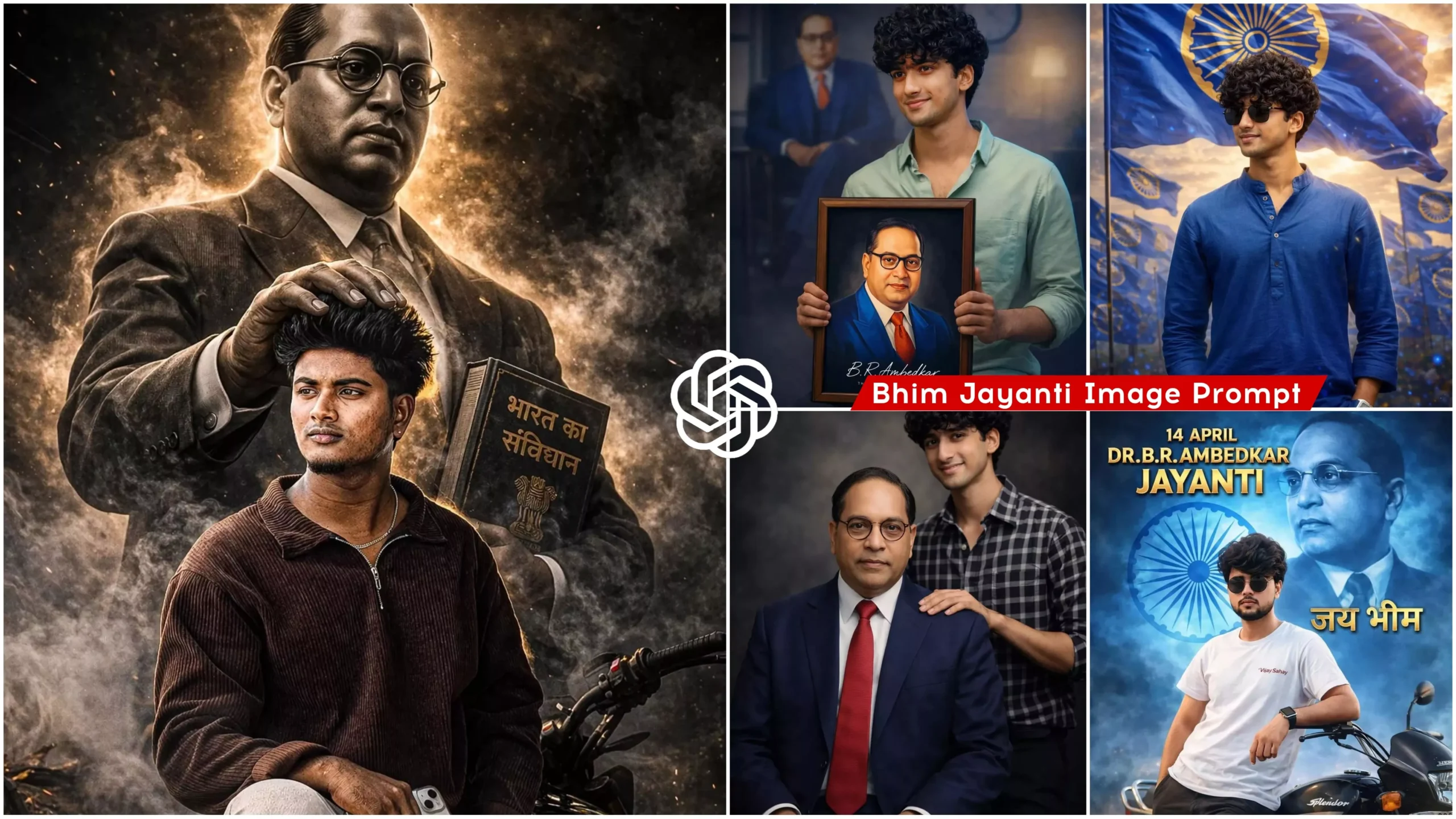
Now, let me tell you about this AI photo editing process. Friends, in this tutorial, we will be creating various AI-generated images to celebrate Babasaheb’s birthday. In some images, you will see yourself seated with a large portrait of Babasaheb in the background, where he appears to be placing his hand on your head to offer his blessings. In others, Babasaheb is seated on a chair while you stand behind him, set against a cinematic background. You will encounter various such image styles and prompts throughout this editing process. And friends, creating these images is incredibly simple; we will be generating them with the help of ChatGPT. You are free to use either ChatGPT or Gemini—whichever you prefer.
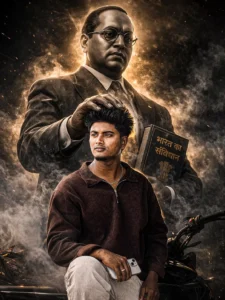
Create a highly dramatic and cinematic Person Behind him, generate a massive, di babasehb Ambedkar The divine figure should appear like a protective guardian emerging from smoke and shadows, placing a gentle, powerful hand over the man's head as if giving him strength. Use dark, moody lighting with strong contrast, smoke effects, rim lights, and hyper-realistic textures. Make the entire image intense, powerful, and motivating. tra-realistic, &KJigh detail dramatic atmosphere
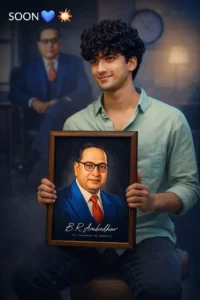
Ultra-realistic DSLR portrait of a young Indian man sitting on a stool, holding a framed portrait of Dr. B. R. Ambedkar in his hands, facing camera with a confident smile.HARD FACE LOCK (CRITICAL): Use the provided reference image and preserve the face 100% identical — same identity, facial structure, skin tone, eyes, eyebrows, nose, lips, jawline, beard pattern, hairstyle, forehead tilak, and natural skin texture. No face modification, no beautification, no smoothing, no symmetry correction.Outfit: light pastel green shirt, casual and clean look.Pose: seated posture, body slightly angled, holding a vertical frame with both hands, relaxed shoulders, direct eye contact with camera, smiling naturally.Framed image: modern stylized portrait of Dr. B. R. Ambedkar (blue coat, orange/red tie, glasses), black background inside frame, visible signature-style text at bottom (“B. R. Ambedkar” with tagline), premium wooden frame.Background: creative composite scene — large blurred/faded image of Dr. B. R. Ambedkar sitting on a chair behind the subject, soft office-like setting with chair and wall clock subtly visible.Extra elements:Top text: “SOON” with arrow → followed by blue heart emoji and explosion emoji (💙💥), minimal and clean.Lighting: studio + soft cinematic blend, front soft light on subject, slight blue highlight/rim light on one side, background softly diffused.Camera: 50mm lens, mid-shot framing, shallow depth of field, ultra-sharp focus, 8K resolution.Color tone: cinematic blue + warm skin tones, high contrast, poster-style grading.Style: hyper-realistic photography mixed with digital poster art, no distortion, no extra fingers, no artifacts.
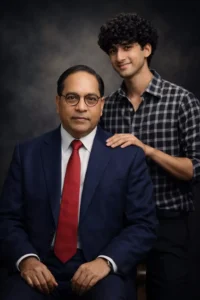
A highly detailed, ultra-realistic 4K studio portrait photograph featuring Dr. B. R. Ambedkar seated confidently on a chair. He is wearing a deep blue suit, a crisp white shirt, and a red tie, along with his iconic round-frame glasses. His posture is dignified, and he is looking directly at the camera.
Behind him stands a young man (use the provided reference photo strictly for face), wearing a black and white checkered shirt. He is smiling gently and placing one hand on Dr. Ambedkar’s shoulder in a respectful and proud manner. His face must match exactly with the reference image — same facial features, expression, skin tone, and structure (no alteration or beautification).
Both individuals are positioned very close to each other, maintaining a natural and realistic interaction. Both are looking directly at the camera.
The background should feature a dark, smoky atmosphere with soft, moody lighting, creating a cinematic studio feel. The lighting should highlight their faces with subtle shadows and depth.
Maintain accurate clothing details, realistic textures, and perfect facial identity matching. The composition should feel powerful, respectful, and visually balanced.
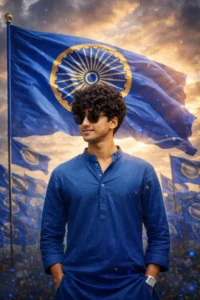
A high-resolution, cinematic poster for Ambedkar Jayanti. In the center a 21-year-old Indian man with a stylish haircut, wearing a white "vijay" branded t-shirt and dark cargo pants, leans confidently against a black Hero Splendor motorcycle.
The background features a massive, ethereal blue-tinted portrait of Dr. B.R. Ambedkar. the Ashoka Chakra and "जय भीम" Dr. Ambedkar.
Top text: "14 APRIL DR. B.R. AMBEDKAR JAYANTI" in bold, 3D golden lettering.
Bottom text: "JAY BHEEM" in large golden.
How to Create Image Using Prompts
As you can see above, distinct image prompts are provided directly beneath their respective images. To generate an image, simply copy any one of these prompts, and then open the ChatGPT application. Alternatively, you can click the “Create Your Image” button to navigate to the ChatGPT website. Once there, paste the prompt into the designated area. Next, you will need to add a real image of yourself or a selfie; use the plus (+) icon to upload your image. Finally, click the “Generate” button and wait for a few moments. ChatGPT will then generate your image, producing a result that precisely matches the prompt you provided.
Conclusion
In this way, you too can generate AI images for Babasaheb’s birthday—specifically, for Bhim Jayanti. Friends, these images look absolutely realistic and unique; moreover, since such images are currently going viral on social media, you too stand to benefit from this trend. Furthermore, if you wish to create more trending photo edits of this kind, you can visit this website to copy a wide variety of image prompts. We hope you enjoyed this article; please be sure to share it!