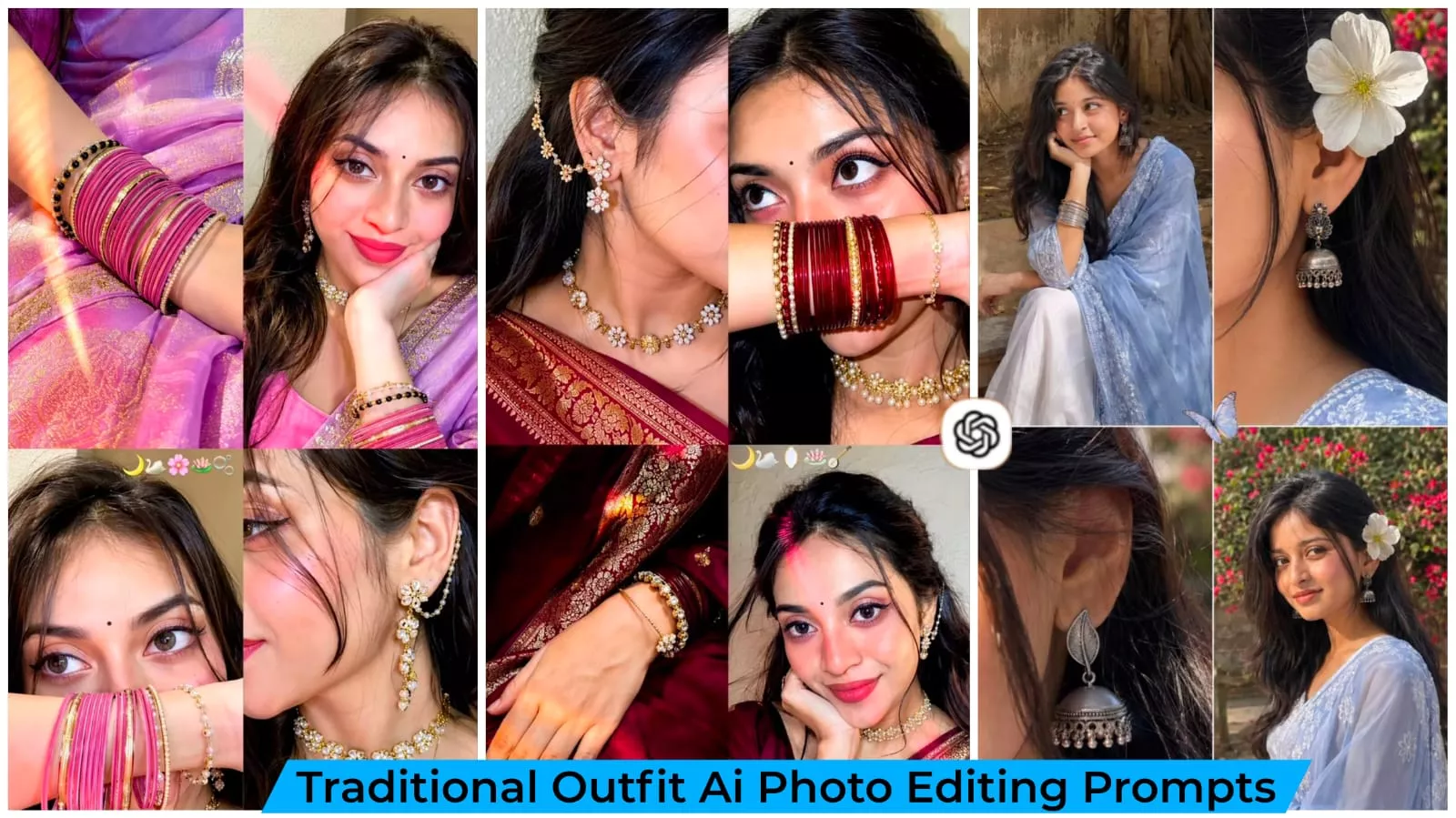
Traditional Outfit Ai Photo Editing Prompts – Millions of photos are uploaded to social media daily, each following different trends—ranging from “royal” looks to cinematic or wedding-themed styles. However, a new trend is currently going viral where people are uploading photos of themselves in traditional attire. It is worth noting that these images are created using ChatGPT, a process that has become incredibly easy these days. In this trend, people transform their ordinary photos into images where they appear dressed in traditional clothing—looking as though they are ready for a festival, a wedding, or a cultural event. The most interesting aspect is that there is no need to buy new clothes or schedule a professional photoshoot; a simple, everyday photo of yours can be converted into such a striking image.
Traditional Outfit Ai Photo Editing Prompts
What is traditional outfit? Look Traditional Outfit is a photo editing style in which any person’s photo is converted into a traditional outfit. In this, keeping in mind the face recognition, body structure, lighting, all the things, a photo is prepared in which the photo looks absolutely natural. This is especially for those people who want to present themselves on social media in Indian culture style on their profile or if it is a trend right now then you can also create it. Not necessary. If you want to present yourself in trend then if you create such a photo then people also like it a lot.
Why do trends go so viral?
The reason this one is taking off is that we can transform an ordinary selfie into a photo featuring a traditional look—something that might otherwise be difficult to achieve. You might not own the specific outfits, or perhaps you lack the professional camera setup; there is always some hurdle involved, which is likely why you are here. This trend allows you to create various traditional-style photos without actually doing a photoshoot. That is the main reason it is spreading so rapidly; social media tends to boost content that is truly unique, and this trend fits that description perfectly.
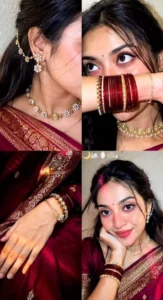
Ultra-realistic candid indoor iPhone 16 front-camera selfie collage, 2×2 grid with four equal square frames, looks like naturally captured real-life selfies instead of AI-generated art. Authentic iPhone front camera quality with subtle sensor noise, realistic fine film grain, tiny handheld motion blur, slight autofocus softness, natural HDR-off processing, no beauty filter, no skin smoothing, no over-sharpening, true-to-life skin texture with visible pores, peach fuzz, natural lip texture, realistic eye reflections, soft lens imperfections, slightly compressed smartphone image quality. Subject: Young woman wearing a deep maroon silk saree with intricate gold woven border and matching maroon blouse. Small black crescent moon bindi centered on forehead. Long dark brown hair with soft waves, middle parting with loose face-framing strands. Soft natural glam makeup, warm brown eyeshadow, thin eyeliner, long natural lashes, glossy nude-pink lips, naturally flushed cheeks. Wearing a pearl-and-gold floral choker necklace, matching dangling floral earrings with ear chain attached to hair, stacked maroon bangles mixed with gold and pearl bracelets, delicate bracelet on wrist. Frame 1 (Top Left): Medium close-up selfie from approximately 45–50 cm away. Subject resting chin on folded right hand, head tilted gently toward the hand, soft closed-mouth smile, looking directly into the camera. Left shoulder slightly forward. Saree draped naturally across shoulder. Background is a textured off-white and beige wall. A vivid warm pink-red light stripe crosses diagonally from upper left forehead over the left eye, nose, cheek and ends across the chin. Remaining face illuminated with warm soft flash. Frame 2 (Top Right): Tight close-up from approximately 22–25 cm away. Subject raises forearm horizontally, covering mouth and nose while displaying stacked maroon and gold bangles. Eyes looking upward slightly to the left with calm dreamy expression. Hair strands falling naturally over forehead. Jewelry sharply visible. Warm pink-red light reflecting onto bangles and lower cheek. Frame 3 (Bottom Left): close up , her bangles resting on her lap above her saree. Frame 4 (Bottom Right): Close-up side profile from approximately 28–32 cm away. Face cropped from nose backward, highlighting ear jewelry, floral ear chain, neck and pearl choker. Saree border visible across shoulder. Head turned slightly away from camera. Hair tucked behind ear. Warm flash lighting creating realistic shine on jewelry and soft shadows beneath chin and neck. Lighting: Single iPhone front flash as primary light source with a warm ambient indoor lamp. Strong pink-red LED light streak cast diagonally across the face in the first two frames, warm golden-orange light streak in the third frame, soft warm neutral lighting in the fourth frame. Gentle falloff, realistic highlight roll-off, accurate skin reflections, subtle shadow under chin, nose and hair strands, natural specular highlights on jewelry. No studio lighting. Background: Soft indoor room with lightly textured cream wall, shallow depth perception created naturally by smartphone optics, uncluttered background, warm cozy indoor environment. Camera & Composition: Real iPhone 15 front camera, 26 mm equivalent ultra-wide selfie lens, handheld capture, natural framing, casual candid composition, authentic selfie perspective, realistic arm length distance in each frame, slight perspective distortion typical of smartphone front cameras, no cinematic depth effect, natural smartphone exposure. Color Grading: Warm amber and soft rose tones, gentle magenta highlights, realistic skin color, rich maroon fabric, muted cream background, soft contrast, slightly lifted blacks, balanced whites, natural saturation, realistic smartphone white balance, no teal-orange grading, no artificial HDR look. Quality: Looks like an authentic real-life iPhone selfie collage captured casually indoors, not AI-generated, not digitally painted, not overly perfect. Slight sensor grain, tiny motion blur from hand movement, realistic compression artifacts, natural facial asymmetry, believable lighting, true smartphone photo realism.Aspect ratio 9:16.
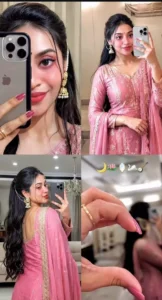
Ultra-realistic candid indoor iPhone 15 front-camera selfie collage, 2×2 grid with four equal square frames, looks like naturally captured real-life selfies instead of AI-generated art. A young beautiful curvy woman, she has bright fair smooth skin, beautiful make up, extra long volume hair, some hair falls her face, she wears traditional gold pearl big sharara earings with Pearl chain tucked her hair, no-makeup make up look. Gold three ring finger. An indoor mirror selfie 4-panel collage of a beautiful Indian woman in a rose pink and gold embroidered kurta sharara with dupatta set.Sequence of shots: a close-up detail shot where the phone nearly obscures the face and right side of her face is completely visible and subtle smile also visible; a waist-up mirror selfie a close-up of rose pink nail polish making a half-heart gesture; selfie camera seen from a three-quarter front view. Her front is to the camera, showcasing her open hair and styled hair; and finally, a front-facing camera selfie characterized by her complete outfit with a dupatta in a luxurious living room. Simple, elegant, realistic photography. Aspect ratio 9:16. Don't change the face.Add a very small black bindi on her forehead.
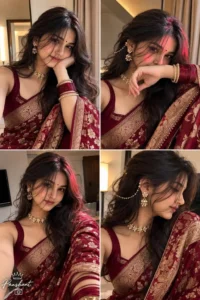
Premium Short Prompt (Face Lock Version) Use the uploaded image as the ONLY face reference. Preserve the face 100% exactly—no changes to facial structure, eyes, nose, lips, skin tone, hairstyle, or identity. Create an ultra-photorealistic 2×2t indoor iPhone 16 Pro front-camera selfie collage (9:16). Natural handheld selfie perspective with subtle wide-angle distortion, realistic sensor grain, JPEG compression, tiny motion blur, authentic skin pores, baby hairs, natural lip texture, and true smartphone front-camera quality. No AI look, no beauty filter, no portrait mode.Subject wears a deep maroon Banarasi silk saree with antique gold zari border, matching blouse, pearl-and-gold floral choker, floral earrings with ear chain, stacked maroon glass bangles, gold kadas, rings, and a tiny black crescent bindi. Frames: Chin resting on folded hand, soft smile, warm flash. Forearm covering lips, dreamy eyes, pink-red LED streak. Medium selfie with direct eye contact, diagonal pink-red light.Side-profile close-up highlighting ear jewelry, choker, and saree border.Warm indoor cream-beige background, iPhone front flash mixed with ambient lamp lighting, realistic reflections, premium smartphone color science, cozy atmosphere. Negative Prompt: AI face, face swap, beauty filter, plastic skin, over-sharpening, CGI, painting effect, extra fingers, distorted anatomy, blur, watermark, text, logo, low quality. Add bottom-left signature: "Prashant" in elegant handwritten style with a small crown above and a camera icon below.
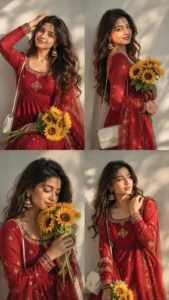
Soit aesthetic 4 pane collage of same -lace young Indian woman with long hair. wearing deep red anarkali dress, sheer dupatta, Wearrings, white shoulder bag. holding sunflower bouquet. 4 poses: (1) hand on hair: (2) side pose hold bouquet: (3) eves closed looking at flowers: (4) hand off purse, dreamy look. Warm side sunlight, soit shadows, clean neutral background, slight blus shallow depth..9:16 ratio .
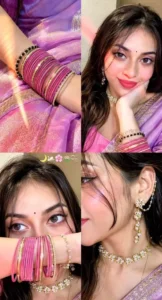
Ultra-realistic candid indoor iPhone 15 front-camera selfie collage, 2×2 grid with four equal square frames, looks like naturally captured real-life selfies instead of AI-generated art. A young beautiful curvy woman, she has bright fair smooth skin, beautiful make up, extra long volume hair, some hair falls her face, she wears traditional gold pearl big sharara earings with Pearl chain tucked her hair, no-makeup make up look. Gold three ring finger. An indoor mirror selfie 4-panel collage of a beautiful Indian woman in a rose pink and gold embroidered kurta sharara with dupatta set.Sequence of shots: a close-up detail shot where the phone nearly obscures the face and right side of her face is completely visible and subtle smile also visible; a waist-up mirror selfie a close-up of rose pink nail polish making a half-heart gesture; selfie camera seen from a three-quarter front view. Her front is to the camera, showcasing her open hair and styled hair; and finally, a front-facing camera selfie characterized by her complete outfit with a dupatta in a luxurious living room. Simple, elegant, realistic photography. Aspect ratio 9:16. Don't change the face.Add a very small black bindi on her forehead.
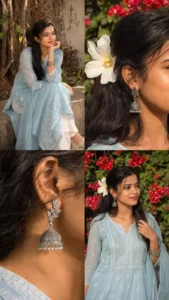
Create an ultra-realistic 4-panel vertical collage (2x2 grid) of a young South Asian woman wearing a soft pastel blue traditional kurta (fabric is lightweight, sheer georgette/chiffon with a graceful fall) with white patterns and white palazzo pants. The collage should feel natural, candid, and aesthetic like a Pinterest editorial shoot. Maintain the same face identity across all panels.
What changes can AI make to your photos?
You see, AI today isn’t limited to just basic background swaps; its capabilities are virtually limitless. You can create whatever you can imagine—all you have to do is specify the details. For instance, you can define the style of clothing, ensure the color combination is perfect, and add traditional jewelry. AI then automatically enhances the lighting, crafts a background that matches the cultural setting, and optimizes the image quality. However, if you fail to explain these details clearly, your photo won’t turn out with the best possible results.
How To Create Images?
We have already shared the prompt for creating this photo; simply copy it from here. Next, open ChatGPT and upload your photo by clicking the plus (+) icon—you can upload any photo. Then, hit generate and wait a short while; it will process and prepare an excellent version of your photo, yielding outstanding results.
Conclusion
We hope we’ve provided you with all the editing details so you don’t encounter any problems. However, if you encounter any issues, please contact us. We’ll explain what needs to be fixed and how. If you enjoyed this description, please let us know in the comments.