Underwater AI Photo Editing Prompts – I came across some impressive editing on Instagram—specifically, an underwater style that people were experimenting with extensively—in which you appear to be completely submerged beneath the surface. In these images, glowing fish can be seen swimming alongside you, while sunlight streams down from above. The most astonishing revelation, however, was this: these photos were generated using AI. Initially, I assumed they were actual photographs taken with a camera; but upon realizing the truth, I decided that I absolutely had to give this trend a try—and share it with you as well. In this article, I will walk you through exactly how you can recreate this viral editing style, and also demonstrate how to achieve a professional-quality edit using ChatGPT.
How We Got Started?
Let me tell you how we got started. You see, we didn’t have any fancy, expensive cameras—we simply took a standard selfie. When we asked ChatGPT to process it, it executed the task perfectly; however, the challenge at this stage was the need to provide much more detailed instructions. Specifically, you need to incorporate specific details into your request. If you structure your prompts correctly, the resulting images will turn out beautifully. Finally, when our image was ready, I was absolutely blown away. The result was truly extraordinary—it generated a unique image that looked incredibly realistic, as if I were actually immersed in a fantastical underwater world. I’m going to show you exactly how I created this.
What Is This Underwater Editing?
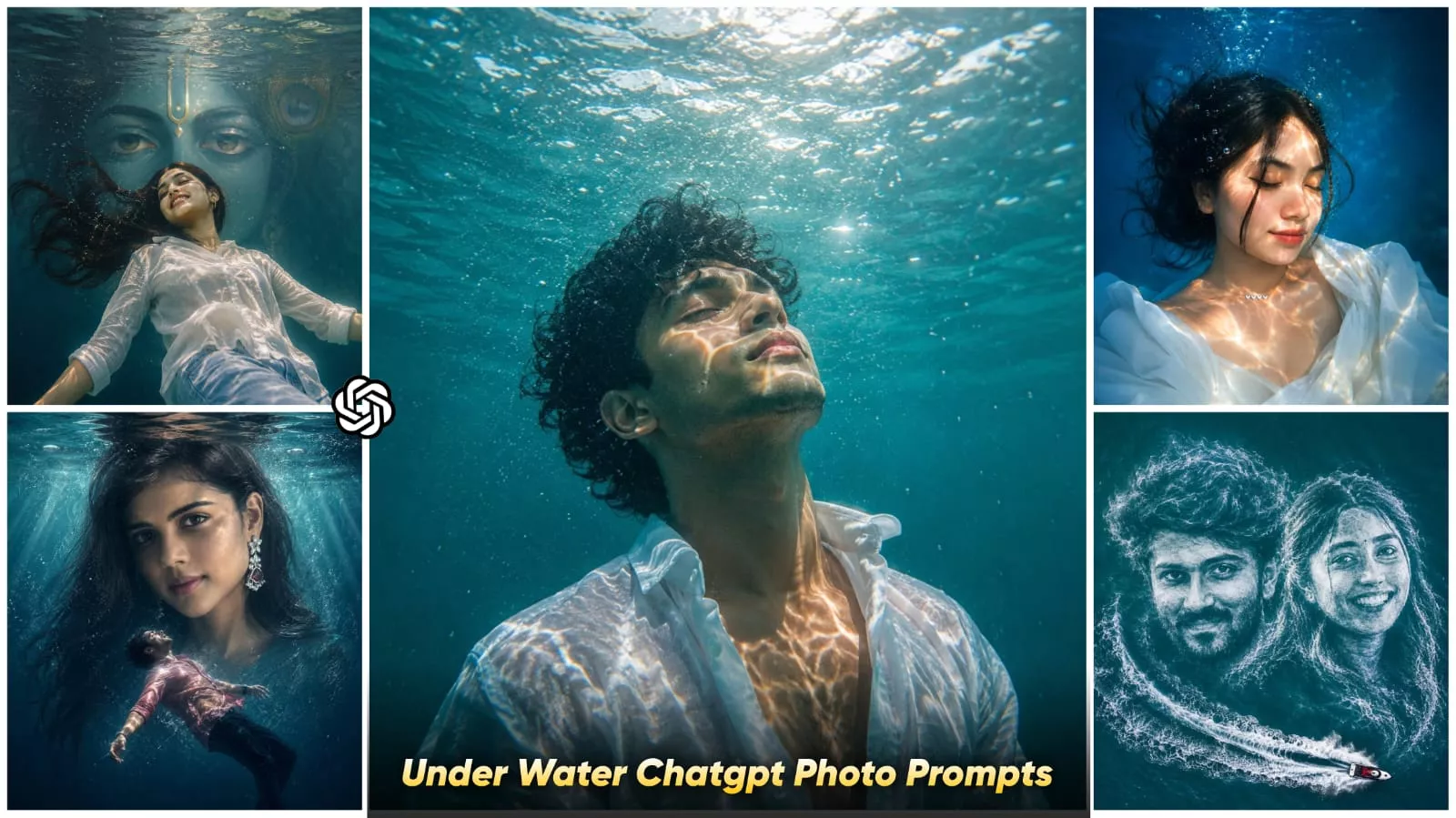
Let’s understand it. It is a cinematic editing style in which your normal portrait is converted into an underwater look. But it is not just about adding underwater. The actual magic comes from these things. Blue ocean lighting comes in your photo. Your body is shown loading. The hair in it starts flying as you go inside the water. That is shown in that way. Bubbles are shown in it. Then after that the rays of the sun. It comes inside the water from above. Things like that have been added.
Why Is This Trend Going So Viral?
The reason for its viral success is that, while every other person on Instagram is posting generic sunset or mirror selfies, this “underwater editing” style creates a truly cinematic portrait that presents your photo in a completely unique and striking manner. People tend to zoom in on the image to scrutinize whether your photo is authentic or if it was generated by AI; however, by looking at your face, it is impossible to tell that it is AI-generated, as the resulting image is created with absolute realism. ChatGPT is currently producing these photos with exceptional results—and the best part is that even beginners can create them!
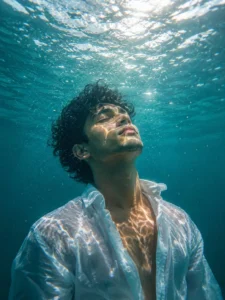
Hyper-realistic submerged portrait of a young male beneath crystal-clear aqua water, framed chest-up in ultra-cinematic underwater photography style. Camera slightly below eye level, angled upward as he floats vertically in stillness, head tilted toward the glowing surface. Eyes closed, calm meditative expression, dark short hair drifting naturally underwater. Loose white button-up shirt partially open, fabric weightless and softly flowing. Bright sunlight pierces from above, creating intricate caustic light refractions across skin and clothing. Rich turquoise surroundings with underwater haze, depth fade, delicate rising bubbles, reflective ripples, teal-and-amber cinematic grading, warm skin tones, muted ocean blues, realistic water distortion, ultra-detailed facial texture, HDR lighting, crisp focus, serene minimal atmosphere, ultra-realistic 8K underwater photography.
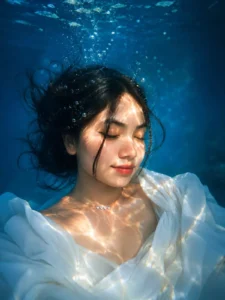
cinematic underwater portrait of a young woman (attached photo) floating peacefully beneath clear blue water, eyes closed, wet white shirt flowing softly, sunlight reflections creating golden ripple patterns across his face and body, detailed curly hair moving underwater, dreamy mood, ultra realistic, soft natural lighting, bubbles around, calm emotional expression, high detail skin texture, teal ocean tones, shallow depth of field, professional photography, 4K, vertical composition, Instagram aesthetic
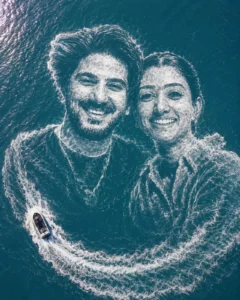
Keeping the exact facial features of uploaded image couple, create an ultra realistic aerial drone view portrait of ocean water,both their faces should be formed in the form of soft water waves. Both faces look at the camera. One jet boat should be moving beside their faces. It should be like jet boat making the face formation. Ensure drone view. Aspect ratio 4:5.
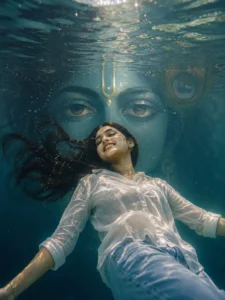
A surreal yet realistic underwater scene of a young woman fioating calmly, body slightly arched backward, viewed from a low angle. The water surface above shows soft natural ripples with gentle sunlight rays entering the water, creating subtlecaustic light patterns.In the background, krishna eyeframe symmetrically, partially blended with water reflections.Hehas natural brown eyesLighting is soft and cinematic, natural sunlight, nooverexposed glow, no heavy particles. Colors are balancedwith mild teal water tones and warm skin tones, notoversaturatedStyle: ultra-realistic digital art, clean details, sharp focus, minimal noise, natural textures, no excessive effects, nofantasy glow, no sparkles.
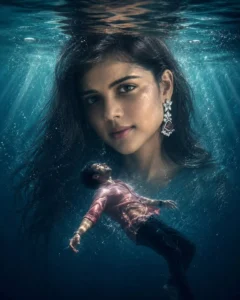
A surreal yet realistic underwater scene of a young man floating calmly, body slightly arched backward, viewed from a low angle. The water surface above shows soft natural ripples with gentle sunlight rays entering the water, creating subtle caustic light patterns. In the background, a large realistic Indian woman's face fills the frame symmetrically, partially blended with water reflections
How To Create Image Using Underwater AI Photo Editing Prompts?
To create this image, you must first open ChatGPT. Click on the plus (+) icon to upload your photos—whichever images you wish to use. Once uploaded, paste the prompt you previously copied. Then, when you click “Generate,” the tool will process your image to match the exact style shown in the reference example. After copying the prompt and saving the resulting image, simply open the saved file; you will find a “Save” button there, which allows you to save your photo in high quality.
Conclusion
You can create photos using this new Instagram trend, which I’ve explained in detail. It’s completely unique and will allow you to create truly stunning photos, with results you’ll love. If you like this editing technique, let us know in the comments. We’ll bring you more amazing topics to help you create even more amazing photos.