Viral Street Blure Ai Photo Edititing Prompts – As you all likely know, there is currently a trend of viral photos—specifically, a certain type of photo that is spreading rapidly online. I am going to explain exactly how you can create one of these easily; I will provide all the details and guide you through the process step-by-step. So, let’s get started—just pay close attention, create your own, and make it go viral.
Why Is This Photo Going Viral
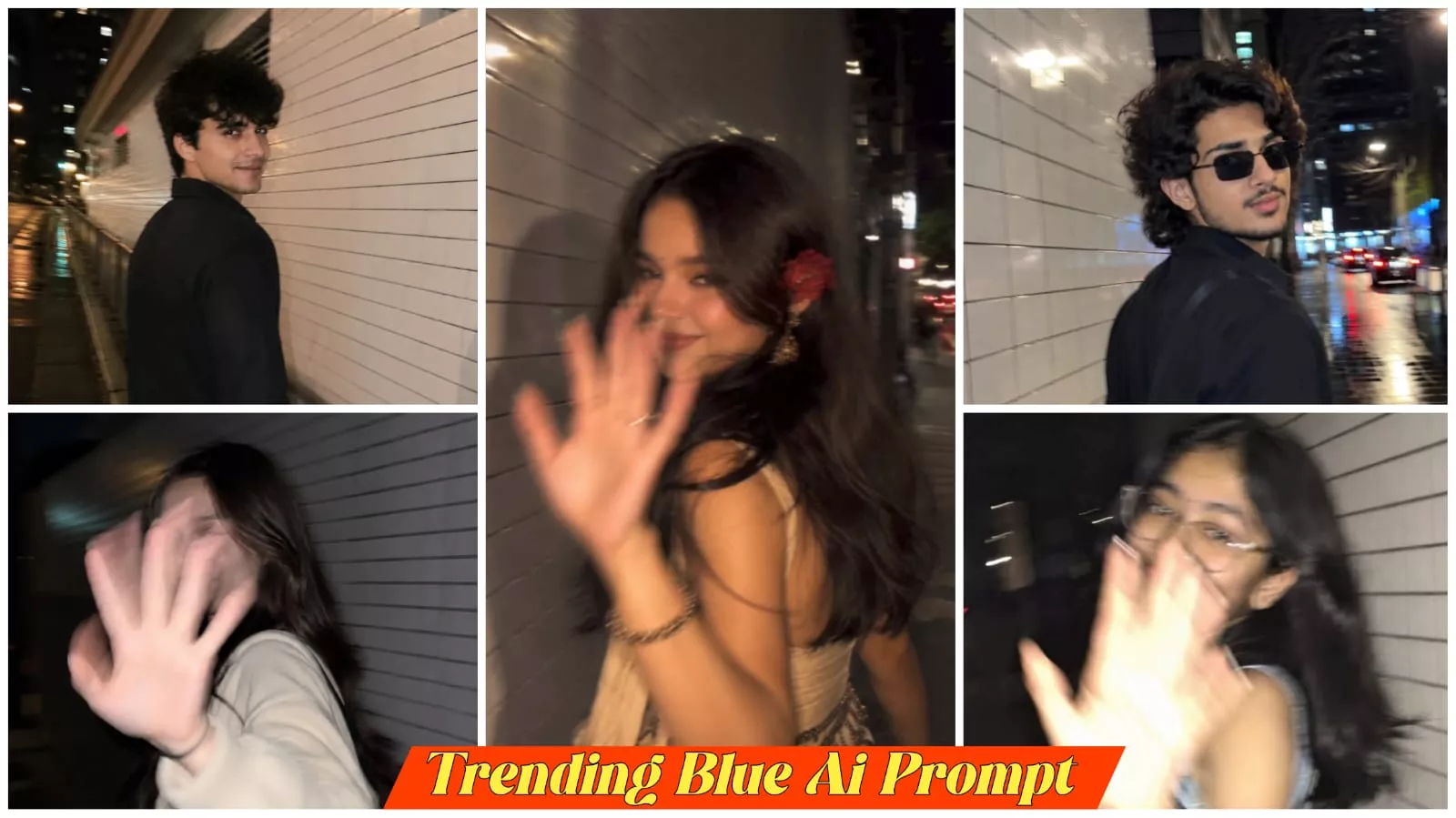
Let me explain why this photo is trending so much and what it actually is. It is trending because it features a unique blur effect that anyone can easily create. The process involves taking a normal photo and applying this specific edit; the technique is explained in detail, making it easy to understand and helping it go viral. A distinctive feature of the image is that one hand is positioned towards the front, giving it a unique look that contributes to its popularity. If you apply this blur effect and upload the edited photo to Instagram, you too can easily go viral—there is a very strong chance of it happening, and the process is simple to execute.
Best Ai Tool Selection
Let me guide you on selecting the best AI tools for creating these kinds of photos. I will tell you about a few top tools—such as ChatGPT, Google Gemini, and Leonardo AI—so you can choose the one that works best for you. While there are many options, these are the ones we focus on. Currently, Leonardo AI is extremely popular for image generation because it delivers outstanding results; that is why I recommend using it and am explaining the process here. It has a huge following, and people use it to create images that help their videos go viral. I have provided the specific prompt here, so you can use it to easily generate your “blurred-style” photo. If you are looking for a different type of photo, feel free to ask me in the comments.
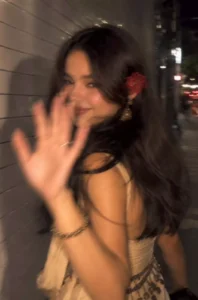
Ultra-realistic candid smartphone photograph, 9:16 vertical.Use the attached image only as a strong visual inspiration for general facial proportions and vibe, while ensuring the generated subject remains fully original, non-identifiable, and not a face copy.SceneNighttime on a quiet Tokyo city sidewalk beside a building with white ceramic tile walls.The subject is walking past the camera, partially side-on, captured mid-step in a rushed, accidental moment.Poses & Gestures (combined naturally)The subject reacts instinctively to being photographed: turning her head back mid-walk as if surprised,raising one hand close to the lens to partially block the camera, shy, restrained smile forming as she suppresses laughter, body angled in half-profile while continuing to walk forward, motion carries her slightly out of frame, imperfect framing.Expressions are subtle and spontaneous — embarrassed, playful, fleeting — never posed.Camera & MotionShot on a modern smartphone, handheld, rushed capture. Strong uncontrolled camera shake. Heavy directional motion blur across the raised hand, hair, and face. Facial features appear smeared and streaked by movement, faintly recognizable but distorted. Partial ghosting around the body. Imperfect framing, subject nearly leaving the frame.LightingFlash-only lighting fired mid-motion. Harsh flash highlights on skin and hand. Deep surrounding darkness.Uneven exposure, blown highlights, hard shadows typical of hurried night phone photography.BackgroundWhite ceramic tile wall stretches into streaked light bands due to motion blur. Street surroundings fade into darkness with minimal readable detail.MoodCandid, shy, slightly playful. Feels intrusive, raw, imperfect, and authentic - like a fleeting memory accidentally captured and never meant to be perfect.Image QualityExtremely noisy. Heavily blurred. Raw smartphone look. Not cinematic. Not editorial. Not polished.Negative Promptanime, illustration, painting, stylized, studio lighting, beauty lighting, soft portrait, sharp focus, clean face, perfect anatomy, smooth skin, fashion editorial, posed portrait, cinematic grading, film still, tripod shot, professional photography, identity match, face copy, real person replication.
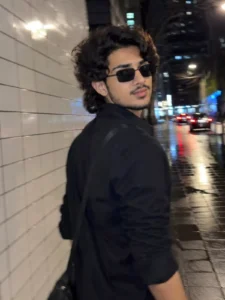
Ultra-realistic candid smartphone photograph, 9:16 vertical.Use the attached image only as a strong visual inspiration for general facial proportions and vibe, while ensuring the generated subject remains fully original, non-identifiable, and not a face copy.SceneNighttime on a quiet Tokyo city sidewalk beside a building with white ceramic tile walls. A young man is walking past the camera, partially side-on, captured mid-step in a rushed, accidental moment.Poses & GesturesThe young man reacts instinctively to being photographed: turning his head back mid-walk as if surprised, raising one hand close to the lens to partially block the camera, a shy, restrained smile forming as he suppresses laughter. His body remains angled in half-profile while continuing to walk forward, with motion carrying him slightly out of frame. Imperfect framing.ExpressionSubtle, spontaneous, embarrassed, playful, and fleeting—never posed.Camera & MotionShot on a modern smartphone, handheld, rushed capture. Strong uncontrolled camera shake. Heavy directional motion blur across the raised hand, hair, and face. Facial features appear smeared and streaked by movement, faintly recognizable but naturally distorted. Partial ghosting around the body. Subject nearly leaving the frame.LightingFlash-only lighting fired mid-motion. Harsh flash highlights on skin and hand. Deep surrounding darkness. Uneven exposure, blown highlights, and hard shadows typical of hurried night phone photography.BackgroundWhite ceramic tile wall stretches into streaked light bands due to motion blur. Street surroundings fade into darkness with minimal readable detail.MoodCandid, shy, slightly playful. Feels intrusive, raw, imperfect, and authentic—like a fleeting memory accidentally captured and never meant to be perfect.Image QualityExtremely noisy. Heavily blurred. Raw smartphone look. Not cinematic. Not editorial. Not polished.Negative Promptanime, illustration, painting, stylized, studio lighting, beauty lighting, soft portrait, sharp focus, clean face, perfect anatomy, smooth skin, fashion editorial, posed portrait, cinematic grading, film still, tripod shot, professional photography, identity match, face copy, real person replication.
How To Create Image Viral Street Blure Ai Photo Edititing Prompts
The method to create this is extremely simple; let me walk you through it. First, open the ChatGPT app I mentioned earlier. Once the app is open, tap the plus icon—you’ll find it on the left side. Clicking it will reveal several options like ‘camera’ and ‘gallery’; select ‘gallery’ and choose your best photo. Then, copy the prompt from our website and paste it there. I highly recommend using the specific, detailed prompt I’ve provided—which makes the creation process very easy—because I can’t guarantee the results if you use a different one. After pasting the prompt, hit ‘generate’ to create your viral photo. You can then easily make it go viral on Instagram by using a trending song and popular hashtags.
Conclusion
Like I will tell you the details about blood photo editing in this post and you might not understand some of it. If by chance you don’t understand it then you can ask us by commenting so that we can try to clear your doubt and create such photos. If you want to know about any other photo or viral editing then you can ask us by commenting and tell us by commenting, we will reply to your comment and will definitely include that post.