Chibi Cartoon Style AI Photo Editing Prompts – Friends, right now on social media, everywhere you look, people are sharing photos featuring this “chibi” art style. Creating these chibi-style cartoon edits is actually quite simple. If you aren’t sure how to do it, in this article today, I will teach you exactly how to perform this chibi photo editing. You can create these chibi-style edits using just a simple prompt and the help of an AI tool. Your real-life photos will be transformed into these adorable chibi cartoon characters, allowing you to easily convert your standard photos into an aesthetic look. You don’t need to do anything complicated—just read through this article, and I will guide you step-by-step on how to master this chibi AI photo editing technique.
Details Of Chibi Cartoon Style AI Photo Editing Prompts
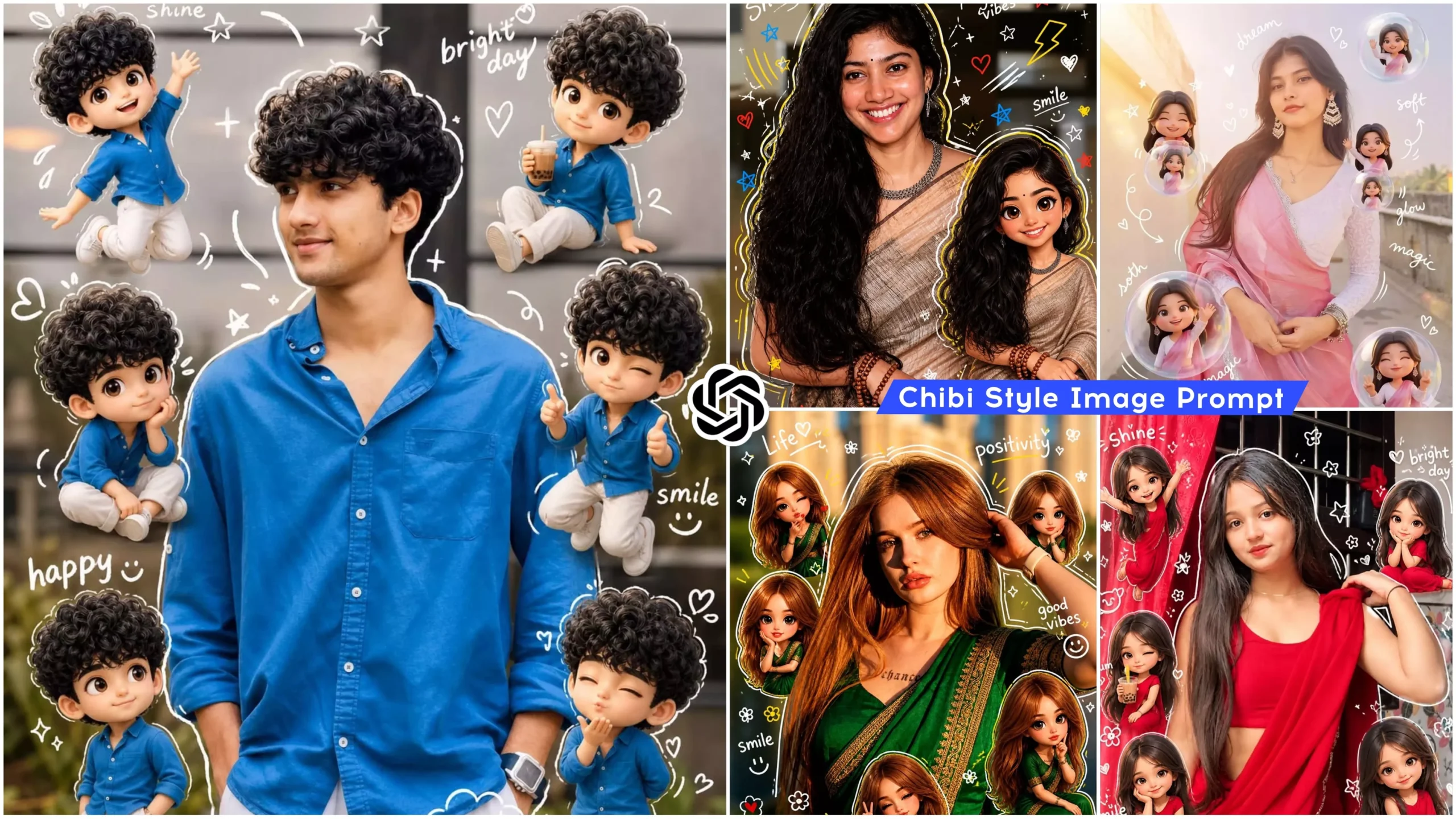
Look—this Chibi AI photo editing style is currently trending massively on Instagram. The best part about it is that you simply need to upload one of your own photos, and the editing will be applied directly to it. Several 3D cartoon-style Chibi characters will be seamlessly integrated into your real image. This adds an aesthetic flair to the photo, and—remarkably—these cartoon characters will bear a striking resemblance to your own face. It will look as though cartoon versions of yourself are surrounding your body. Additionally, stylish text elements—such as “Happy Smile”—will be added to the photo; the specific text included will vary based on the different prompts used. You can generate these photos using specific prompts, a variety of which you will find listed within this article.
Why This Editing Is So Viral?
Look—this Chibi-style photo editing has become a major trend on social media and is going viral rapidly. This is because the editing style incorporates cute 3D cartoon elements that lend an aesthetic appeal, and people are absolutely loving it. It creates a unique aesthetic vibe within the photos. Best of all, these images are generated effortlessly with the help of AI, meaning we don’t have to perform any manual editing ourselves. You can easily create them using tools like ChatGPT or Gemini.
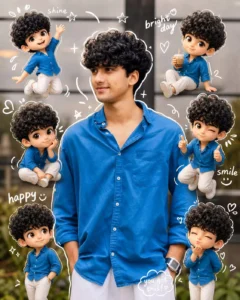
Use a real face as a reference photo. The background is the same as in the photo. The lighting is warm, soft, and clean, with subtle shadows. Around the image, add several mini chibi (3D cute style) versions of the character, while maintaining the original facial features. expressions: jumping cheerfully waving sitting relaxedholding a drink cute and playful expressions Add hand-drawn white doodle elements: outline around the main body stars, hearts, sparkles motion lines small cute icons Add aesthetic handwriting such as: "shine," "bright day," "happy," "smile," etc. (casual doodle font) Overall style: clean & aesthetic composition white sticker outline soft pastel color tone high detail 3D chibi glossy look cute Korean style instagrammable 4:5 ratio
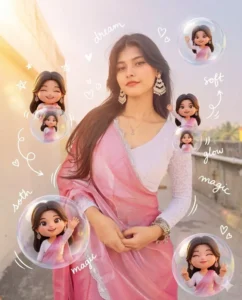
Use a real face as reference. Keep original background. Warm soft lighting with a dreamy glow. Add multiple 3D chibi mini versions of the character interacting with floating transparent bubbles (inside bubbles: smiling, posing, waving). Add glossy reflections and light flares. Include white doodle elements like sparkles, tiny hearts, swirl lines, and bubble trails. Add aesthetic handwritten words like “dream,” “soft,” “glow,” “magic.” Style: pastel dreamy tones, glossy 3D chibi, soft blur highlights, clean Instagram aesthetic, 4:5 ratio.
How Do You Create This Image
As I mentioned in the previous paragraph, you can create this photo edit with the help of either ChatGPT or Gemini; the process for generating the image is identical on both platforms. However, since ChatGPT is currently trending and everyone is using it, you too can perform this viral chibi-style photo editing using ChatGPT. Simply copy any of the prompts provided in this article. Now, open ChatGPT. Paste the copied prompt into the interface, and use the plus icon to upload a high-quality image of yourself that clearly shows your face—as these chibi cartoon characters will be applied directly onto your actual image. So, after uploading a suitable image, click the “Send” button and wait a few moments; your AI-generated image in the chibi style will be ready, featuring chibi cartoon elements overlaid onto your original photograph.
Conclusion
So friends, in this way, you too can edit your photos in the Chibi style. This article provides you with the prompts for Chibi-style photo editing; you can now use them to create your own images. I hope you understood the process I explained and that you enjoyed this article. Keep visiting this website for more such trending photo editing tutorials.